Tangle Color by Number Book
- 4.9
- Rating
- 1.00M
- Installs
- Free
- Price
 Analysis by App-foxy
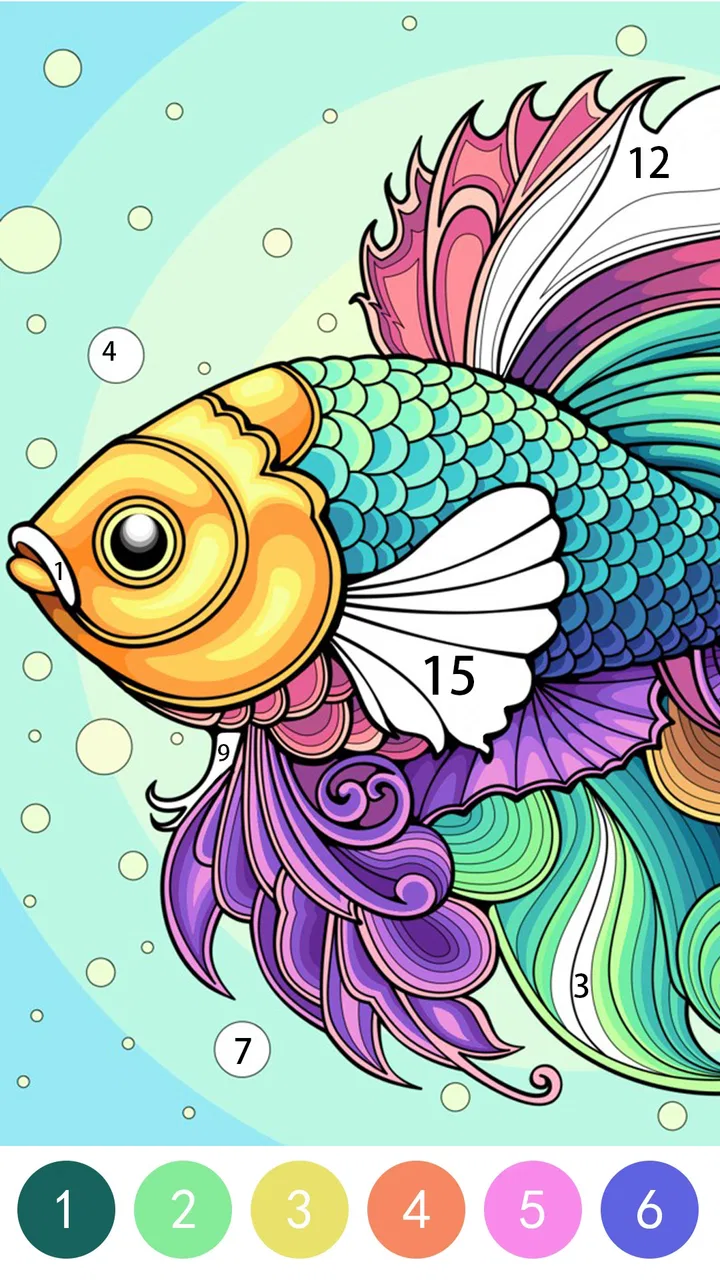
I spent time with Tangle Color by Number Book as a quiet, low-pressure board game rather than a traditional puzzle challenge. Its basic idea is easy to understand: choose a picture, follow the numbered color areas, and gradually turn a blank design into a finished illustration. That simplicity is the main reason I can see people returning to it. You do not need a long explanation before playing, and there is no complicated setup standing between you and the first completed image.
The game is made by LoveColoring Game and is available for free, with optional purchases ranging from $0.99 to $49.99 per item. It is rated for Everyone, so its gentle presentation makes sense for a broad audience. I would describe it as a relaxing digital coloring activity with board-game classification, not as a competitive strategy title. If you want a calm way to fill a few spare minutes, it is easy to recommend. If you are looking for deep tactics, multiplayer competition, or a demanding test of planning, you will probably find it too lightweight.
How Tangle Color feels in its current form
The opening experience is deliberately approachable. The numbered format gives me a clear next action without making me think about color theory, drawing skill, or composition. That matters for younger players, people who do not consider themselves artistic, and anyone who wants an activity that can be started while waiting for an appointment or winding down before bed.
You May Also Like

 Blood Strike: 2.5 Anniversary
Blood Strike’s Loadouts Turn Every Drop Into a Tactical Gamble
A close look at Blood Strike’s custom loadouts: how fast access to signature weapons reshapes its battle royale rhythm, rewards preparation, and narrows the gap between fights.

 Pandora - Music & Podcasts
Pandora’s Music Is Easy to Start, but Harder to Recover
Pandora’s strength is its low-effort path from a seed to a station. Its weak spot is how much confidence it asks you to place in connection, setup, and quiet recovery.

 8 Ball Pool
 Is Built on Rivalries, Rematches, and Routine
A close look at the rivalries, rematches, shared routines, and unanswered safety questions that turn a quick pool match into a persistent mobile community.

 Samsung Music
’s Quiet Strength Is Playing What You Already Own
Its reach comes less from spectacle than from dependable access to a personal library. That simplicity is both the app’s strongest retention engine and its ceiling.

 AccuWeather: Weather Radar
AccuWeather Review: A Quick, Clear Forecast for Everyday Decisions
For everyday plans, the best forecast is the one you can understand quickly. AccuWeather makes rain timing, radar, and local conditions easy to act on, with a few trade-offs.

 Hill Climb Racing
Why Hill Climb Racing Still Turns Crashes Into One More Run
A tiny car, a bumpy hill and one more upgrade: Hill Climb Racing keeps resurfacing because its simple chaos makes every near-miss feel personal.
More From Our News Desk



What I like most is the steady visual progress. A picture begins as a collection of unfinished sections, and each correct color placement makes the result feel more complete. This creates a small rhythm: inspect the image, locate the matching number, fill an area, and pause to see the design develop. It is not an intense loop, but it is satisfying in the same way that sorting, tidying, or completing a simple checklist can be satisfying.
The board-game label may set the wrong expectation if you normally associate that category with turns, dice, cards, or opponents. Here, the board is closer to a structured canvas. The numbered spaces provide the rules, while the coloring process provides the reward. I found that distinction useful when deciding whether the game suited my mood. I opened it for relaxation, not for a contest.
The store summary, “Unleash Your Creativity,” is broad, but the actual appeal is more specific: it gives creativity a safe framework. I am not asked to invent an image from an empty page. Instead, I make a series of small choices inside a prepared design. That makes the experience less intimidating than a blank drawing app and more focused than an unrestricted coloring tool.
A practical way to use it during a busy day
One realistic use is a short evening break. I can start a picture, complete a few numbered sections, and stop without losing the sense that I have made progress. It works better for this than a game that requires a full match or a long uninterrupted level. The same quality makes it suitable for a child who wants a quiet activity nearby while an adult handles another task, although I would still treat any digital game as something to use with sensible supervision.
Another useful routine is to choose a picture when I feel mentally scattered and work methodically from one visible area to another. Rather than tapping randomly across the whole design, I can finish one region before moving to the next. This reduces the visual clutter of uncompleted spaces and makes the result easier to appreciate. It is a small workflow, but it changes the game from casual tapping into a more deliberate wind-down activity.
I also found that it helps to use a larger screen when available. Small numbered sections can demand careful attention, and a bigger display makes it easier to distinguish neighboring areas. On a phone, the game remains convenient for quick sessions, but a tablet-style screen is more comfortable when I want to spend longer with a detailed picture.
What the numbered format does well
The numbered system removes one of the biggest barriers in digital coloring: uncertainty about what to do next. In a conventional coloring app, I may spend more time choosing a shade than actually coloring. Here, the number gives me an immediate target. That makes the experience especially friendly for first-time users and for anyone who prefers guided activities.
There is also a useful balance between recognition and repetition. I still need to look closely enough to find the correct areas, but I am not solving a difficult visual riddle. The game rewards attention without punishing me for taking a slow approach. I can treat it as a concentration exercise, a casual pastime, or simply a way to watch an illustration emerge.
My main reservation is that the same guidance can reduce variety for experienced artists. Once the expected color is assigned to each numbered space, there is less room for personal interpretation. A freeform coloring app is better if I want to experiment with unusual palettes, shading, or deliberately breaking the suggested pattern. Tangle Color by Number Book is strongest when I want structure, not artistic control.
Development and the current version
The game launched on December 4, 2024, and the current version is 1.2.1. That places it in a relatively early stage compared with long-established coloring platforms. I see the version number as a useful signpost: the experience is already presented as a usable product, but it is also the kind of app that may continue to be refined as the developer responds to real-world use.
I would not read the current version as a promise of a particular future feature. What I can say is that the present build establishes a clear identity. It is a guided coloring game, accessible to a wide age range, with a simple interaction that does not require a tutorial-heavy introduction. Any future improvement would be most valuable if it preserved that immediate ease instead of adding systems that distract from the central activity.
The technical entry point is also reasonably broad: the game supports Android 8.0 and later. That makes it relevant to people who are not using the newest phone, although the comfort of the experience will still depend on screen size, touch accuracy, and how detailed the selected artwork is. A supported operating system does not automatically mean every older device will feel equally pleasant for careful coloring.
Its audience appears to be responding well so far. The game has an average rating of 4.9 from around fifteen thousand ratings, and it has passed one million installs. Those figures do not tell me that every player will enjoy the format, but they do suggest that the uncomplicated approach is connecting with a substantial audience. I would still interpret the response alongside the game’s narrow purpose: strong approval here likely reflects satisfaction with relaxing guided coloring rather than enthusiasm for complex board-game mechanics.
What changes mean for people already playing
For an existing player, the most important point is that version 1.2.1 remains centered on the same accessible premise rather than asking users to relearn an elaborate system. Someone who already enjoys numbered coloring should be able to continue using the game as a familiar, low-effort activity. That continuity is valuable because this type of app often becomes part of a personal routine rather than a title played in long, intense bursts.
Players who installed an earlier build may be especially interested in whether the experience feels stable and comfortable on their particular device. I would judge that through ordinary use: how easy it is to select small sections, whether the screen remains readable, and whether the pace feels relaxing rather than fiddly. Those practical details matter more here than flashy additions. A coloring game succeeds when its interface stays out of the way.
The free entry point also lowers the risk of trying it. I can explore the basic experience without paying first, then decide whether optional items are worthwhile. That is a better arrangement for this kind of casual game than forcing a purchase before I know whether the coloring style suits me. At the same time, the broad purchase range means I would pay attention before confirming anything, especially if a child is using the device.
My advice is to treat purchases as optional enhancements to an activity you already enjoy, not as a requirement for discovering whether the game works for you. Start with the free experience, see whether the numbered workflow feels satisfying, and only then consider spending. If the basic loop already feels repetitive, buying more content is unlikely to change that fundamental reaction.
Where it still falls short
The biggest limitation is repetition. The core action remains selecting numbered areas and applying their assigned colors. That is precisely why the game is calming, but it also means the experience may lose its appeal for players who need changing objectives, strategic decisions, or a strong sense of challenge. I would not choose it as my main game if I wanted surprises in every session.
It may also be a poor fit for someone who wants genuine drawing practice. The game can encourage attention to detail and provide a creative-looking result, but it does not replace learning to sketch, mix colors, or build an image independently. A dedicated drawing application is the better choice for developing those skills. Tangle Color by Number Book gives me a guided finish; it does not teach me how to create the artwork from scratch.
Another trade-off is the relationship between detail and comfort. More intricate pictures can make completion feel rewarding, but they can also turn a relaxing session into a search for tiny numbered sections. On a phone, that may lead to accidental taps or repeated zooming and repositioning. My practical solution is to use shorter sessions for detailed designs and avoid judging the game by one especially fiddly picture.
The free-to-play structure deserves a measured look as well. Optional purchases between $0.99 and $49.99 per item cover a wide span, so I would approach the higher-priced options carefully. The game is most appealing when it remains a simple break, and spending more can make that break feel less casual. Parents should also make sure purchase controls are appropriate before handing the device to a child.
Who should try it, and who should skip it
I would recommend it to people who enjoy guided coloring, visual completion, and calm activities that can be paused easily. It is a particularly good match for beginners because the numbered structure answers the question “what do I do next?” without demanding artistic confidence. It can also suit families looking for an Everyone-rated game with a straightforward premise, provided adults manage device use and optional purchases responsibly.
It is less suitable for players who want competition, social interaction, story progression, or difficult puzzles. The game does not appeal to me when I am seeking a sense of urgency or mastery. In those moments, a traditional board game, a logic puzzle, or a competitive mobile title would offer more meaningful decisions. Choosing the right alternative depends on the mood: this one is for decompression, not stimulation.
Compared with a standard coloring book, the digital format is more convenient because I do not need physical supplies, and the numbered guidance makes mistakes less frustrating. Compared with a freeform coloring app, it offers less freedom but more direction. Compared with a conventional board game, it has no need for opponents or a shared table. That combination gives it a specific place: it is a solo, guided coloring pastime that borrows the organized feel of a board without trying to become a full tabletop game.
Small habits that improve the experience
I recommend beginning with a picture whose sections are easy to distinguish rather than immediately choosing the most intricate design. This lets me learn the touch behavior and pacing without turning the first session into a hunt for tiny spaces. Once the basic rhythm feels comfortable, a more detailed image becomes a deliberate challenge instead of an accidental source of frustration.
For longer sessions, I work by clusters. I look for a group of areas carrying the same number, complete the visible cluster, and then move to another section. This is more efficient than scanning the entire picture after every tap, and it lets me see the illustration take shape in stages. It also gives the session natural stopping points, which is useful when I only have a few minutes.
I avoid treating completion speed as the main goal. The game has more value when I let the process remain unhurried. If I rush to clear every number, I start noticing the repetitive tapping instead of the relaxing visual change. Slowing down, checking the image from a little distance, and taking a break between sections makes the same mechanics feel more restorative.
Finally, I would test the game in the situation where I actually intend to use it. A phone that feels perfectly fine for quick coloring may become tiring during a long session, while a tablet may be ideal at home but inconvenient when traveling. That simple trial tells me more than the install decision alone. The game’s success depends heavily on whether its guided pace fits my available time and screen.
What I would watch as the game develops
Because the title is still at version 1.2.1, I would watch for refinements that improve precision and comfort without making the interface busier. Better handling of small areas, clearer visual feedback, and smooth movement around detailed designs would directly support the game’s central purpose. These are the kinds of changes existing players would feel immediately, even if they are not dramatic headline features.
I would also be interested in how the developer handles the balance between free access and optional purchases. The strongest long-term approach would keep the basic activity welcoming while making paid choices feel genuinely optional. For a relaxing game, trust matters: I should be able to enjoy a session without feeling pushed into spending.
More variety would help the game remain useful over time, but variety should not come at the cost of its calm identity. New picture styles, different levels of visual detail, or better ways to organize available designs could extend the life of the app without turning it into a cluttered collection of unrelated systems. I would prefer thoughtful expansion over a large number of additions that make the simple workflow harder to find.
Overall, I see Tangle Color by Number Book as a focused and approachable coloring game that knows what it wants to be. It is free to start, suitable for Everyone, and already has a strong audience response, with 612 written reviews alongside its broader rating activity. I would recommend it to a friend who wants a quiet solo pastime, especially someone who likes visible progress but does not want to draw from a blank page.
My final judgment is positive, with one clear condition: enjoy it for the routine, not for depth. The numbered coloring loop is easy to enter, simple to pause, and pleasant when I want a low-pressure break. Its limits become obvious if I need strategy, artistic freedom, or constant novelty. For the right user, though, that narrow focus is a strength. If you want a guided creative pause rather than a demanding game, this is a sensible one to try.
FAQs for Tangle Color by Number Book
01What is Tangle Color by Number Book?
Tangle Color by Number Book is a relaxing coloring app built around numbered patterns and intricate designs. Instead of choosing colors freely, you fill each section according to its assigned number, gradually revealing a finished image. The experience is designed to be simple and calming, making it suitable for short breaks, creative relaxation, and users who enjoy structured coloring challenges.
02How does the coloring system work in Tangle Color by Number Book?
After selecting an illustration, the app displays numbered areas that correspond to specific colors. You choose a color or numbered section and tap the matching spaces to complete the artwork. The guided system makes the app easy for beginners, while detailed tangle-style patterns can still require patience and attention. Progress is generally saved as you work through an image.
03Is Tangle Color by Number Book free to download and play?
The app can typically be downloaded without an upfront charge, but the available experience may include advertisements, optional purchases, or premium content depending on the version and platform. Some illustrations or features may be accessible only after watching an advertisement or subscribing. Before downloading, users should check the current store listing for pricing, in-app purchase details, and any regional differences.
04Does Tangle Color by Number Book require an internet connection?
An internet connection may be needed to download the application, load new artwork, display advertisements, synchronize content, or complete optional purchases. Previously downloaded coloring pages may work offline, although this can vary by device and app version. If offline use is important to you, it is best to test a completed or downloaded design before relying on the app during travel.
05Who would enjoy using Tangle Color by Number Book?
Tangle Color by Number Book is a good choice for users who enjoy coloring, geometric artwork, repetitive patterns, and relaxing activities that do not require advanced skills. It can appeal to both adults and older children, although parents should review the app’s advertising and purchase settings before allowing younger users to play. People seeking completely free, ad-free, or highly creative freehand coloring may find its limitations less suitable.
Pros
- Simple controls make coloring accessible for all ages.
- Offline play lets you enjoy puzzles without a constant connection.
- Relaxing gameplay is suitable for short breaks or quiet moments.
- Completed artwork can provide a satisfying sense of progress.
- Color puzzles may help improve visual focus and attention to detail.
Cons
- Some levels may feel repetitive after extended play sessions.
- Small sections can be difficult to tap accurately on smaller screens.
- Hints or extra content may depend on ads or in-app purchases.
- The app may use noticeable storage as the artwork library grows.
- Color choices can feel limited when aiming for more creative results.

Tangle Color by Number Book
Gallery